This is a write-up of a real cleanup from October 2026. The site, a US store running WooCommerce and Elementor, belongs to a client of ours, so we’ve left out its name. Everything else is exactly as we found it.
What we found
The client got in touch because customers weren’t receiving order confirmation emails (more on that below). While checking the site we ran a Moatline scan alongside the security plugin it already had. That plugin reported the site as clean. Moatline flagged four critical findings, all in the database:
- Three entries in the
wp_optionstable namedwp_0c8c17509e_cfg,wp_105c46b809_cfgandwp_15384834c4_cfg. - Each held 7–8 KB of encoded JavaScript. One matched a known malware signature; all three matched Moatline’s check for obfuscated script payloads.
No WordPress feature or plugin we know of creates options named like that. The random part changes from site to site, but the shape (wp_, ten hex characters, _cfg) is the giveaway.
How the malware worked
We decoded the three entries without running them. Each one unwraps into the same script, with different variable names so that simple pattern matching misses the copies.
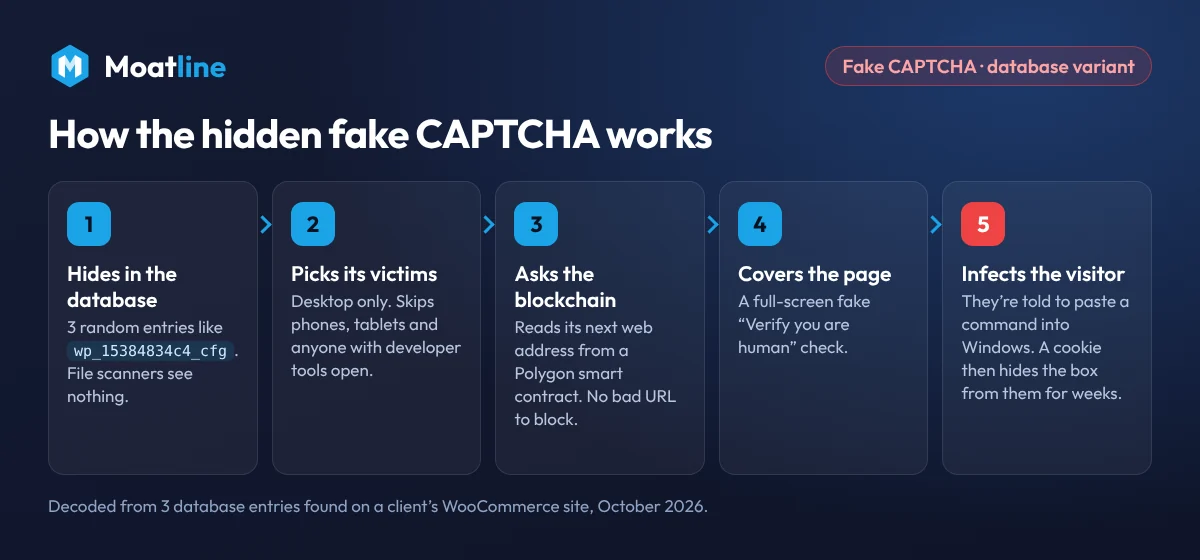
- It picks its victims. It does nothing on phones, tablets, iOS or Android, so most site owners checking on their phone never see it. It also stops if the browser’s developer tools are open.
- It asks the blockchain where to go. It calls a smart contract on the Polygon blockchain through six public endpoints and reads a web address stored there. Nothing in the site’s code points to a suspicious domain, and the attackers can change the destination at any time without touching the site again. Researchers call this technique EtherHiding.
- It covers the page. It adds a full-screen white layer with an iframe loading that address, and gives the iframe permission to write to the clipboard, the hallmark of ClickFix. The visitor sees what looks like a Cloudflare “Verify you are human” check.
- It tricks the visitor. ClickFix pages put a command on the clipboard and tell the visitor to press Windows + R, paste and press Enter, which installs password-stealing malware on their computer. Our fake CAPTCHA (ClickFix) guide explains this step in detail.
- It hides its tracks. Once the fake check is “passed”, it sets two cookies,
_cf_verifiedand_wp_perf_ok, and never shows that visitor the box again.
Why scanners missed it
- No file was changed. The core files matched WordPress.org’s checksums and every plugin matched its official copy. Scanners that only compare files see a clean site.
- Remote scans can’t trigger it. Online scanners load your home page from a server. A script that only runs for desktop browsers, and only after talking to the blockchain, gives them nothing to see.
- It looks like data. The entries are long base64 strings stored with autoload switched off, so they don’t appear in WordPress’s usual list of loaded settings.
How we removed it
- Took a full backup of files and database from the host before changing anything.
- Exported the three entries to a private file (outside the public website folder) as evidence, then deleted them.
- Removed a scheduled task with no name. Normal plugins always name their tasks; a blank one running every hour is a common way for malware to keep a foothold.
- Verified every file against WordPress.org checksums (
wp core verify-checksumsandwp plugin verify-checksums --all) and checked must-use plugins, recently changed PHP files and the site root. - Searched posts, revisions and Elementor data for the same script. Nothing else was found.
- Locked the doors: reviewed every administrator account, changed all passwords, and regenerated the security keys so stolen login cookies stop working.
- Scheduled rescans one day and three days later to make sure nothing comes back.
Check your own site
If you have SSH access (most managed hosts include it), this lists any options with the same pattern:
wp option list --search="wp_*_cfg" --fields=option_name,autoload,size_bytesWithout SSH, run this in phpMyAdmin (change wp_ if your table prefix is different):
SELECT option_name, LENGTH(option_value)
FROM wp_options
WHERE option_name LIKE 'wp\_%\_cfg';
Any result with thousands of characters of encoded text is worth a closer look. The free Moatline Malware Scanner checks the database, posts and page-builder content as part of every scan and flags this pattern automatically.
The other problem: missing order emails
The malware wasn’t what stopped the receipts. The store sent its emails “from” info@ its own domain, straight from the web server. The domain’s SPF record didn’t list the server as an allowed sender, and its DMARC policy was set to p=quarantine. So Gmail, Outlook and the business’s own email filter treated every receipt as a possible fake and quietly quarantined it.
If your WooCommerce emails go missing, check this first:
- Look up your domain’s DMARC record (a TXT record at
_dmarc.yourdomain.com). If it saysp=quarantineorp=reject, unauthenticated mail is being binned. - Send the store’s emails through a transactional email service (Brevo, Postmark, SendGrid and others) with an SMTP plugin such as WP Mail SMTP.
- Add the service’s DKIM records, and add it to your existing SPF record rather than creating a second one.
- Place a test order and check the email arrives.
Indicators
For other site owners and security teams who want to search for this variant:
- Option names matching
wp_[0-9a-f]{10}_cfg, autoload off, holding base64 that starts withKGZ1bmN0aW9uKCl7(“(function(){”). - Polygon contract
0x08207B087F61d7e95E441E15fd6d40BEfd6eD308, read with the method selector0x38bcdc1c. - Calls to public Polygon endpoints, including
polygon.drpc.org,polygon-bor-rpc.publicnode.com,polygon.lava.build,polygon-public.nodies.appandpolygon-pokt.nodies.app. - Cookies
_cf_verifiedand_wp_perf_ok, and a full-screen element with the attributedata-sm="1". - A WP-Cron event with an empty hook name.
Frequently asked questions
Can malware live only in the WordPress database?
Why didn’t I see the fake CAPTCHA on my own site?
Is it safe to delete wp_xxxxxxxxxx_cfg options?
Why are my WooCommerce order emails not being delivered?
Scan your site for free
Moatline checks files, the database and page-builder content. Nothing changes unless you click a button.
More guides
- Bricksforge vulnerability exploited: how to check your site and clean it
- “This site may be hacked” in Google: how to get the warning removed
- WordPress site redirecting to spam? How to find and fix it
- Host suspended your WordPress site for malware? What to do next
- Unknown admin user in WordPress? How to check it, remove it and lock the door
- Japanese or pharma spam in Google results? How to fix the WordPress hack