Find the WordPress malware other scanners miss
Moatline checks your files, your database and your live pages for the tricks modern infections use to hide and come back. Then it locks the door behind them.
Think your site is already hacked? Run a free online check first, then see how to scan WordPress for malware.
- Free forever
- No tracking
- Works alongside Wordfence & Sucuri
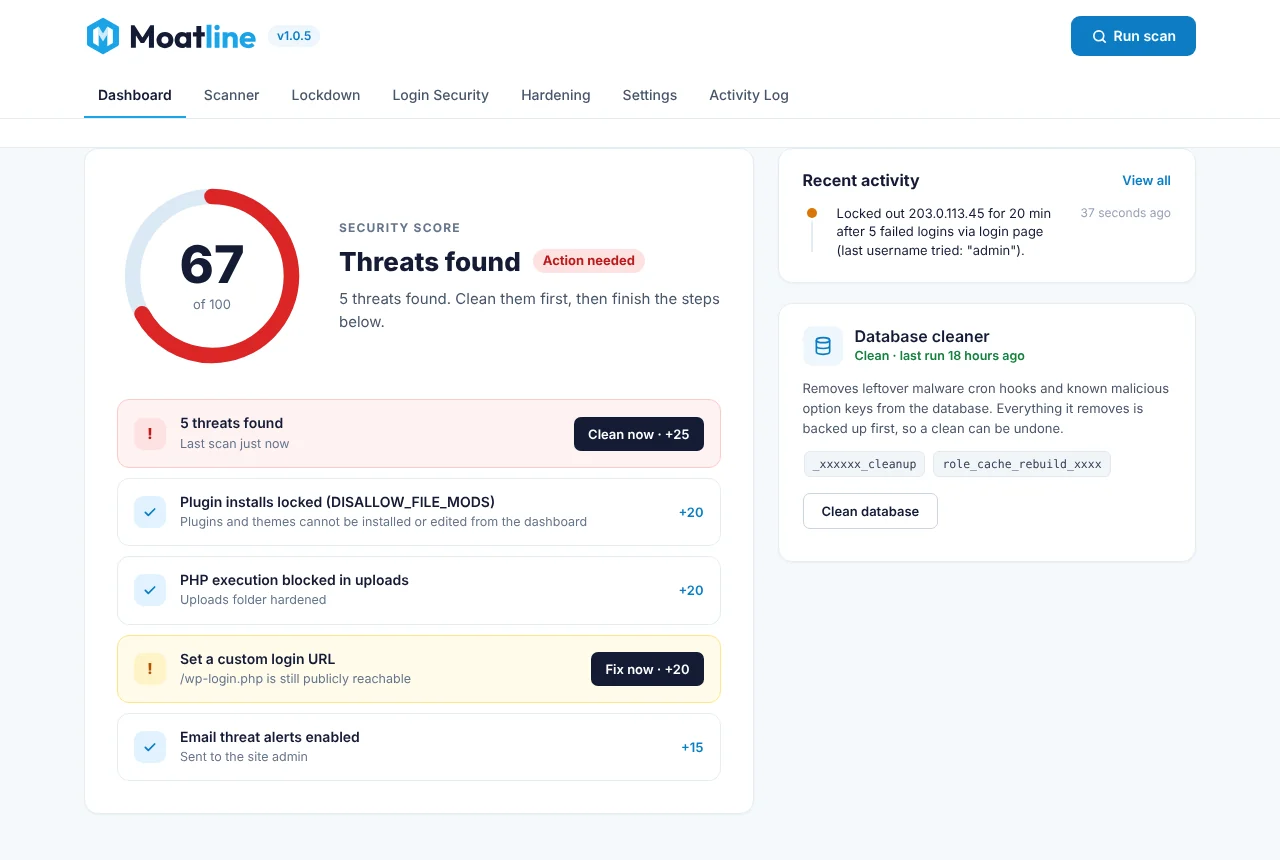
wp_options, where file scanners never look.Modern WordPress malware doesn't look like malware
These are the infections we keep finding on sites where other scanners said everything was fine.
“ClickFix” scripts trick visitors into pasting a command that installs malware on their own computer. How to remove it
Code hidden inside posts, revisions, widgets and Elementor data. No file is touched, so file scanners see nothing.
Payloads fetched from DNS records or blockchain contracts, so there's no suspicious URL to block.
Fake plugins that remove themselves from your plugin list and reinstall each other after a cleanup.
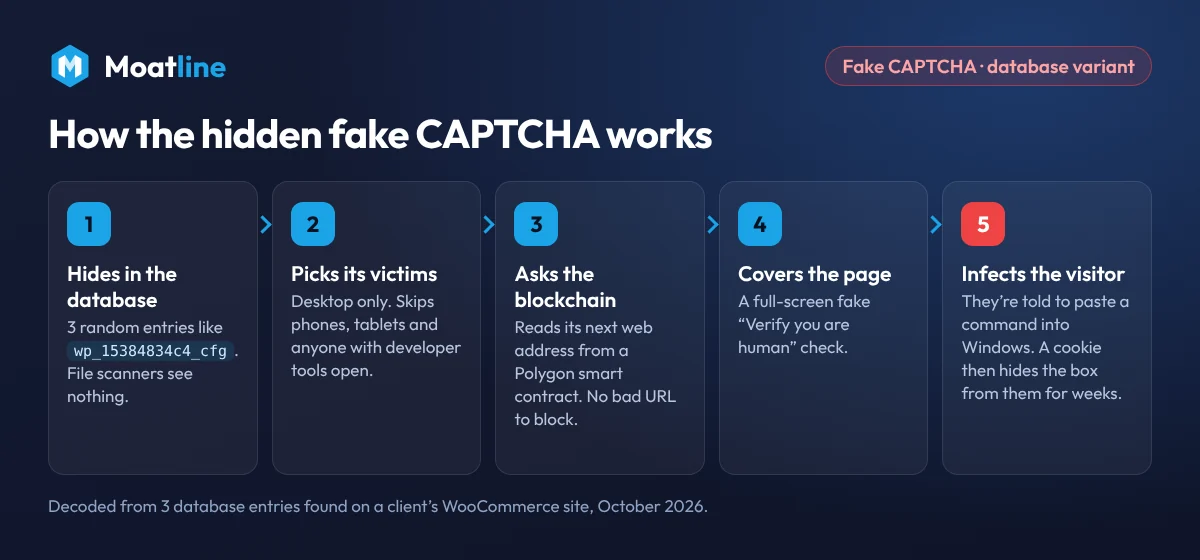
A “clean” WooCommerce store was hiding a fake CAPTCHA in its database
Its free security scanner said all OK. Three random-looking database entries said otherwise. Here's how the malware worked and how we removed it.
Read the case →Find it. Fix it. Lock the door behind it.
Everything below is in the free plugin, except where it says Pro.
A scan that looks where malware actually hides
Thirteen short steps cover plugins, must-use plugins, your theme, drop-ins, the uploads folder, posts and page-builder data, the database and your live home page. Each finding names the malware family it matched.
- Every plugin file compared with its official WordPress.org release
- Fake CAPTCHA, blockchain and DNS loaders, webshells and hidden plugins
- Runs in short steps, so big sites never time out. Pause and resume any time.
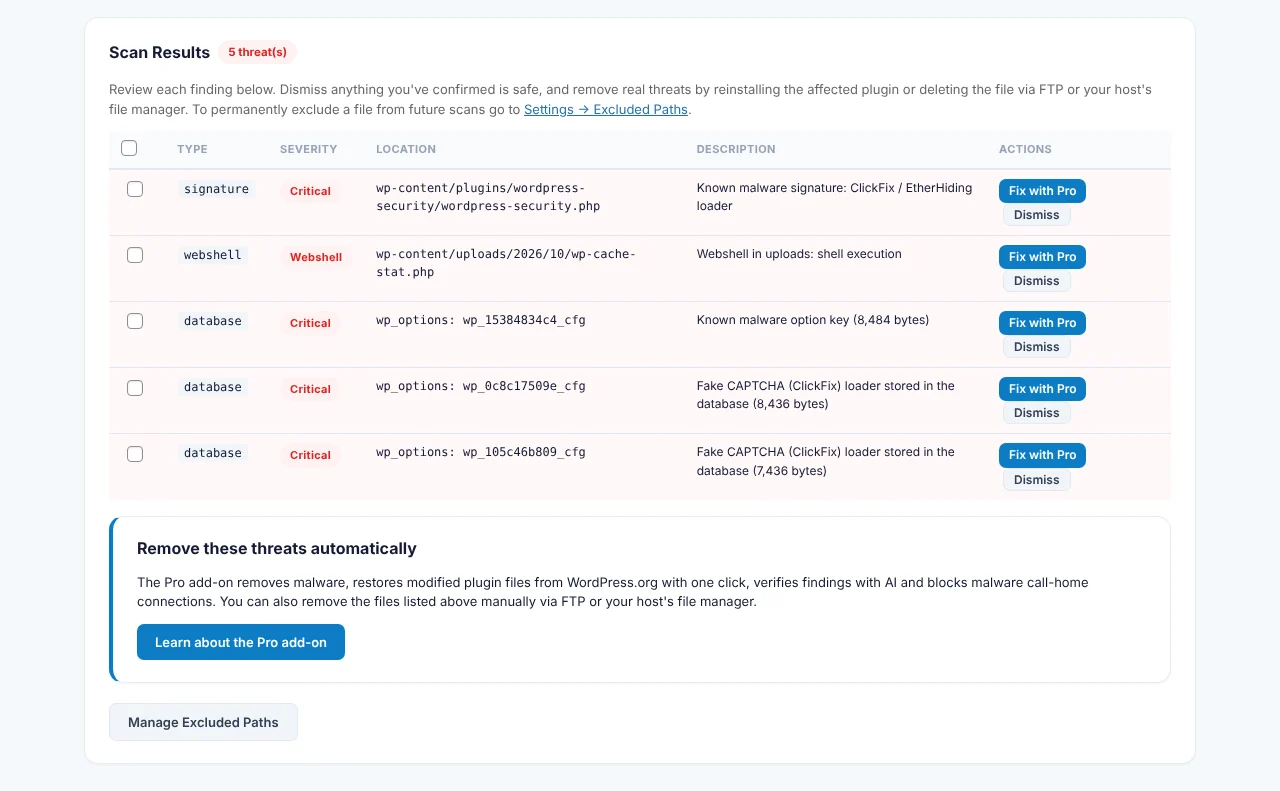
Clear answers, not a wall of warnings
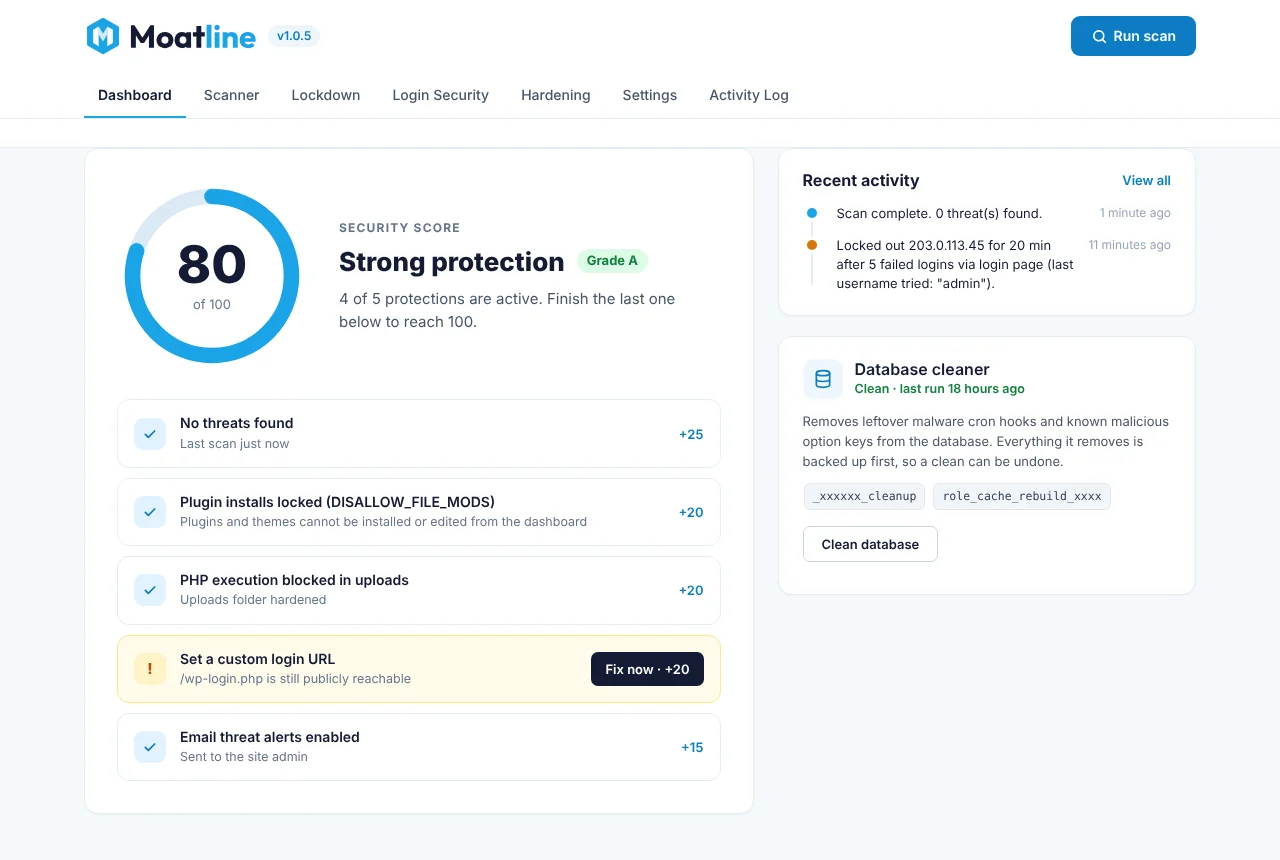
The dashboard turns every scan into a security score and a short list of what to fix next. Infected posts link straight to the editor, and the database cleaner backs up everything it removes, so any clean can be undone.
- Security score with one-click next steps
- Database cleaner with automatic backup and restore
- Warns when a plugin, theme or your WordPress version is under active attack: a free WordPress vulnerability scanner built in
- Pro: remove injected code and restore modified plugin files in one click
Shut the doors attackers use to get back in
Most sites get reinfected through the same way in. Moatline closes the common ones without breaking the plugins you rely on.
- One-click Lock in the admin bar: no new plugins, admins or code uploads until you unlock
- A Security Advisor that checks how your site is set up and fixes gaps in one click
- Two-step login, login limits, hidden usernames and a custom login URL
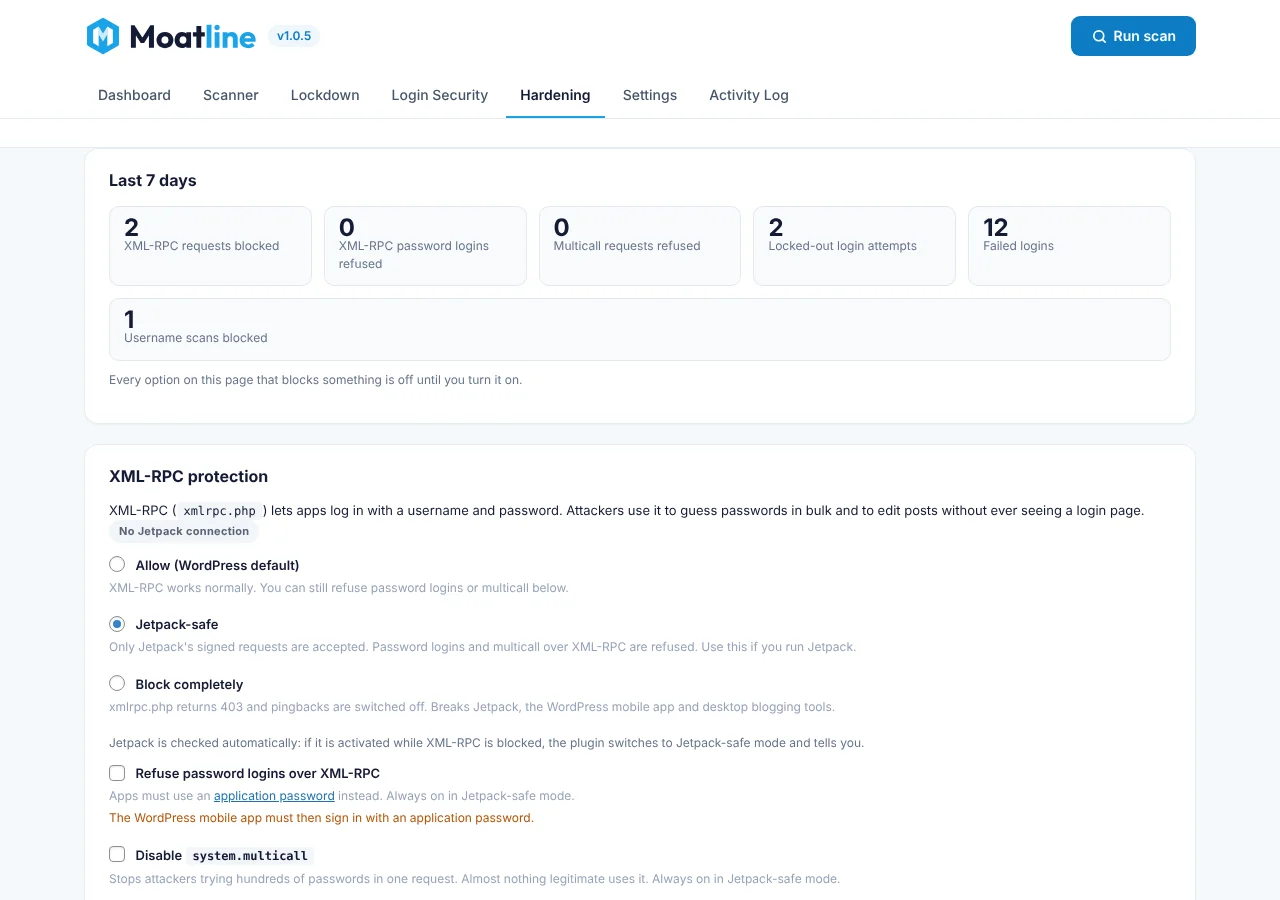
- XML-RPC protection with a Jetpack-safe mode, and one-click “log everyone out”
Three steps to a clean, locked-down site
Install and scan
Install the free plugin from WordPress.org and run a scan. No account, no API key, nothing to configure.
Review what it found
Each finding says what it is and where. Dismiss false alarms, edit infected posts, or reinstall a modified plugin.
Lock the door
Follow the Security Advisor: turn on Lock, two-step login and login limits, then log everyone out and reset the keys so stolen sessions stop working.
Watch the whole set-up on our test site: install, wizard, alerts, two-factor login, Lock and the first scan (5 minutes).
The free plugin finds it. Pro fixes it for you.
Every feature above is free and stays free. The Pro add-on is for agencies and site owners who want threats removed automatically.
| Feature | Free | Pro |
|---|---|---|
| File, database and content scanning | ✓ | ✓ |
| WordPress.org integrity check | ✓ | ✓ |
| Two-step login, XML-RPC and login protection | ✓ | ✓ |
| Site Lock, Security Advisor, live monitoring, database cleaner with backup | ✓ | ✓ |
| One-click removal of injected code and restore of modified plugin files | — | ✓ |
| Automatically strip malicious scripts when they're saved | — | ✓ |
| Daily scheduled scans with email alerts | — | ✓ |
| Require two-step login by role, trusted devices | — | ✓ |
| Block logins by country or bad IP reputation | — | ✓ |
1 site
For your own website
$39/year
or $129 once for lifetime updates
5 sites
For freelancers and small businesses
$79/year
or $249 once for lifetime updates
Prices in US dollars. Every plan includes a 14-day money-back guarantee. Compare Pro plans in detail.
Learn from real cleanups
FBI warning: Gootloader used 1,000+ hacked WordPress sites. How to check yours
On 16 November 2026 the FBI said a malware operation called Gootloader had used more than 1,000 hacked WordPress sites to put fake pages into Google results and infect the people who clicked them, mostly lawyers and legal teams. The FBI didn’t publish a list of the sites, so the only way to know is to check your own. Here is how they were broken into, what to look for and what to do.
5 min read →The Apache HTTP/2 flaw (CVE-2026-119618): what WordPress site owners should do
On 11 November 2026, Apache fixed a critical bug in the part of its web server that handles HTTP/2. If your WordPress site runs on an affected Apache with HTTP/2 turned on, an attacker could crash the server and, in the worst case, run their own code on it, without logging in. On 17 November 2026, Singapore’s Cyber Security Agency said the flaw is reportedly being exploited, so update now. The fix is a server update, so no WordPress, plugin or theme update can do it for you. Here is how to tell whether your site is affected and what to do.
7 min read →WordPress update failed: how to fix it safely
A failed update is annoying, but the real risk is what it leaves behind: a site stuck in maintenance mode, a half-replaced plugin, or an old version with a known security hole. Here is what each error means, how to fix it, and how to tell when the failure is a sign of something worse.
8 min read →Common questions
Will it delete anything automatically?
Does it work alongside Wordfence, Sucuri or another security plugin?
Will blocking XML-RPC break Jetpack or the WordPress app?
I lost my phone and can't log in. What now?
Does it send my data anywhere?
Does it work on Nginx and LiteSpeed?
Who makes Moatline?
Check your site before someone else does
Free, no account needed, and nothing changes unless you say so.
* In our own tests: a full scan of the latest releases of Elementor, WooCommerce, Jetpack, WP Rocket, Autoptimize, LiteSpeed Cache, W3 Total Cache and WP Super Cache (about 21,000 files), October 2026.